Friday, April 6, 2018

[Email Marketing] 03. Create an Email Plan

EMAIL CAMPAIGN STRATEGY
Create an email strategy centered around your marketing objective by putting together the type of content you want to send and when you would like to send it.

  • Email Content Calendar: Think about the email content you want to send your customers. Consider the marketing objective for each of the emails you want to send in your email sequence.
  • Campaign Calendar Schedule: Determine which content piece you should send, how frequently and at what date and time you would like to send it.

WHAT EMAILS TO SEND?
Send emails in a logical sequence. If you are promoting an event, your sequence of emails might look like the following:
  1. Promote Event
  2. Email Confirmation
  3. Event Reminders
  4. Thank You Email
Transactional Email: 
A Transactional Email is sent or “triggered” based on some action taken by an individual. Actions can look like the following: 
- newsletter sign up
- marking a purchase
- completing a task

LIFECYCLE MARKETING OR DRIP CAMPAIGNS
Lifecycle marketing and drip campaigns are an effective way to market and engage with your customer by dropping a small amount of information on them over a period of time.

Be sure that your marketing efforts are representative of your brand, encourage engagement and are optimized for conversion.

[EM] 02. Create an Effective Email Campaign

A great email should have the following: 

  • clear campaign objective
  • compelling subject line
  • descriptive pre-header
  • keep their copy clear, concise and customer-focused
  • have a singular, prominent call to action
  • have visual appeal
Ensure you have a strong subject line and pre-header
Subject line: the subject line should be short, compelling and personalized, enticing the reader to want to open your email. 
Pre-header: the pre-header, snippet or preview text is the information that appears before a subscriber opens an email and is meant to reinforce your subject line.


Elements of an Email
Here are some components of the email.

Pre-header
This is the light grey “pre-header” text that may be displayed in my inbox. Note that this is the first text that appears in the email. The prompt to add the sender to an address book. When customers do this, it ensures that the emails from that sender are not marked as spam or filtered into a “Promotions/Ad” category. This greatly increases the chance that your emails get read. There is also a link to “view in a web browser,” which links to an HTML version of the email.

Header
After the pre-header, you see the United Airlines logo and tagline within a header. This helps subscribers quickly identify the brand. Eye-tracking studies have found that people automatically look for logos on the upper left-hand side of emails.

Links and Social
Next, you see some more direct links to areas on the United website along with social links. It’s usually a good idea to link to your company’s social accounts in most marketing emails.

Footer
Finally, at the bottom of the email I you see the footer. Notice how tiny this text is! It’s pretty hard to read. You see some terms and conditions related to government programs. You also see the physical address of the company along with a link to unsubscribe.


Writing a good email copy: 
email copy should always center around one thing: your marketing objective

Call to action: 
the call to action is the single most important part of your email. The call to action is what will prompt your customer to take the action you would like.

  • Clear
  • Singular - 1/email
  • Descriptive
  • Avoid too much text


Email Template: 
Sender:
Subject Line:
Pre-header:
Main copy:
When:
Where:
Call-ti-action:
Additional copy:


Thursday, March 29, 2018

[Google Analytics] 01. Google Analytics Basics

[Measure & Optimize]

You are provided with the javascript code to track the activity on the page
-> Sends relevant data to GA to be measured

SDK: Software Development Kit
Easy to integrate
-> for Android/ iOS

Google Tag Manager: easy to control and implement different google tags(i.e. GA tags, Google AdWords tag, Double Click tags and so on)

Basic Principles in Google Analytics
1) collection
2) processing
3) configuration: filters
4) reporting: google analytics interface


Saturday, March 24, 2018

[Display Advertising] 05. Video Advertising

Importance of Video Ad
- On average, US adults spend 1 hour and 8 mins per day watching online video(YouTube platform)
VIdeo + Content Marketing strategy

- Creative possibilities
  • convey emotions
  • rich imagery
  • tell stories
- Online video consumption is growing
- Video consumption is an important part of the mobile experience
- Online video offers powerful targeting
- Often part of a larger content strategy

Online video ads: types and formats

1. Instream vs. Outstream Video Ads

- Instream video ads:
These are video ads that are played before (pre-roll ad), during (mid-roll ad) or after (post-roll ad) a video. These ads typically cannot be stopped from playing. In some cases the user can skip the ads after a few seconds.In some cases, a group of ads will play subsequently. Such a group is sometimes referred to as an Ad Pod.

- Outstream video ads:
These are video ads that take place outside of the in-line video experiences. There are several types of outstream ads:
- Native Video: Video ads integrated into the format of a website. These ads typically include a headline, a description, and context for the ad. (ex, on Yahoo website...etc.)
- In-article Video: Video ad that plays between paragraphs of editorial text content (within the article)
- In-feed Video: A native video ad in a social feed (e.g. Twitter), often paired with a headline, description and logo (ex, Twitter)
- Interstitial: Video that appears between two content pages (sometimes also referred to as a transition ad, an intermercial ad or a splash page)

Autoplay vs. Interactive Video Ads
- Autoplay Video Ads: Video ad starts playing without any user interaction
- Interactive Video Ads: Video ads that respond to user input. That input could be starting, pausing or stopping the ad. But it can also be other actions like clicking, filling out a poll inside the video, etc. The interaction is meant to engage the user more with the ad.

Long Form vs. Short Form Video
- When we talk about long or short form video, we refer to the video the ads are being showed in.
- Long Form Video: Longer pieces of video content (more than 10 mins), typically telling a full story (e.g., movies, original series, etc.).
- Short Form Video: Video with a duration of less than 10 mins.

Vertical Video
- While most video plays in landscape orientation, with the orientation of a typical mobile phone device, videos in portrait orientation have become more popular. Vertical Video refers to video that displays in portrait format, no matter how it was shot initially. (ex, Snapchat)

Video Ad Platforms


Tips for effective video ad online
1. Target your ads to your audience: sophisticated targeting is the hallmark of online advertising
2. Create high quality video: make sure your video puts your product or your message in a good light
3. Focus on the beginning of the video: because users can skip the video after a few secs
4. Make your ad work without audio: in many video platforms, ads will start playing without user interaction but also without audio(until the user interacts).
5. Use short video ads: users have little patience for ads, especailly when they are consuming short form video conetnt. Keep your ads short - research shows that 15 sec video ads perform well online. Shorter ads (e.g. the 6 second bumper ad on YouTube) are becoming popular as well.
6. Choose the tone of the ad based on your objective: You can use different tones to bring your message across in a video ad. You use humor, emotion or you can keep things informational
7. Include a call to action: add a button users can click where you can provide a call to action. Or, include a URL or a reference to your FB page for instance, to make sure users know how to follow up on your msg.

Google Ad Words Video Ad Formats
True View video ads: You're only charged when viewers watch or interact with elements of your video.
- It's a win-win: Viewers see videos they're curious about, and you get more views from an audience you know is interested. Because you choose what you want to pay for a view, you get the right audience at the right price. Unlike cost-per-impression (CPM) pricing, you won't need to pay every time your ad is shown.
- Freedom to customize: You can also run videos longer than 30 seconds, so you can experiment with different formats. You can try longer product demos, customer testimonials, or a how-to video demonstrating your product in action.
- Broad reach: TrueView ads can appear on both YouTube and other publisher sites in the Display Network for desktop computers and high-end mobile devices. Note that video content for TrueView ads must be hosted on YouTube.

TrueView in-stream ads:

When should I use it? Use this format when you have video content you'd like to promote before other videos on YouTube and across the Google Display Network.
How does it work? Your video ad plays before, during, or after other videos.
Where can the ads appear? TrueView in-stream video ads can appear on YouTube watch pages and on videos on partner sites and apps in the Display Network.
How will I be charged? You pay when a viewer watches 30 seconds of your video (or the duration if it's shorter than 30 seconds) or interacts with your video, whichever comes first.

TrueView video discovery ads (this format is formerly known as “TrueView in-display ads.”):

When should I use it? Use this format to promote a video in places of discovery, including next to related YouTube videos, as part of a YouTube search result, or alongside other content across the Display Network.
How does it work? Your ad consists of a thumbnail image from your video with some text. While the exact size and appearance of the ad may vary depending on where it appears, video discovery ads always invite people to click to watch the video. The video then plays on the YouTube Watch page or on your channel page.
Where can the ads appear? On YouTube search results; Alongside related; YouTube videos; On the YouTube homepage; As an overlay on a YouTube watch page; On video partner sites and apps across the Display Network
How will I be charged? You’ll be charged only when viewers choose to watch your ad by clicking the thumbnail.

Bumper ads are a short video ad format designed to allow you reach more customers and increase awareness about your brand.

When should I use it? Use this format when you’d like to reach viewers broadly with a short, memorable message.
How does it work? Your bumper video ad is 6 seconds or shorter and plays before, during, or after another video. Viewers do not have the option to skip the ad.
Where can the ads appear? Bumper ads can appear before other videos on YouTube or on partner sites and apps on the Display Network.
How will I be charged? You pay based on impressions. Bumper ads use CPM (cost-per-thousand impressions) bidding, so you pay each time your ad is shown 1,000 times.

Youtube Director App can help you create video ads on a small budget

Two tactics to use are:

  1. Pause keywords with high CPC cost
  2. Expand the list of keywords with keywords similar to the best performing keywords


* Video Advertising Glossary: 
http://dvglossary.www2.iab.com/#block-block-1

[Display Advertising] 04. Display Ad with Google AdWords

The Google Display Network and Adwords


Types of ads:

  • search ads
  • display ads
  • video ads
  • app ads: mobile app installation advertising for Android


Steps for setting up your display campaign:
1. Articulate your marketing objective
2 Set your budget
- The Campaign Spent < Expected Profit
3. Target your campaign
4. Create your ad
5. Measure and optimize

Contextual targeting: match relevant site content
  • Content keywords: Choose words and phrases relevant to your products and services. 
  • Topics: Similar to keywords, this lets you place your AdWords ads on website pages about the topics that you choose.
  • Audiences: Reach specified groups of people

Ad Formats in Google Adwords

1. Responsive Ads
Responsive ads are ads that automatically adjust their size, appearance, and format to fit available ad space. Most of the ads have images, but they could also adjust to just show text.

2. Dynamic Ads
Rich media ads that match people’s location and the content they are seeing, delivering a more compelling message.

3. Lightbox Ads
Rich interactive formats to reach, delight and engage customers with imagery and compelling messaging in different sizes and formats adjusted to the available ad space.

4. Video Ads
Non-skippable in-stream video ads (15 secs, sometimes 30 secs) that run in video content of Display Network Partner sites. Note that if you want your entire campaign to be delivered in video, it is better to set it up as a video advertising campaign, which will give you the option to also run your ads on YouTube (which is not possible through the Ad Gallery).

5.General Purpose Ads
Using text and an image, AdWords adds a bit of animation to attract users’ attention.

6. Gmail Ads
Expandable, interactive ads that appear above the promotions tab in Gmail Inboxes.

[Display Advertising] 03. Display Ad Sales Model

[The Changing Sales Model]

Deals Executed

  • Where will ads run? 
  • Number of impressions
  • Start and end date
Ad Networks Emerged: Publisher's Ad Space
remnant unsold ad inventory
sold premium ad inventory


The Different Display Advertising Sales Models

1. Direct(Premium) Advertising
ex) NYTimes, CNN.com, ESPN.com, Yahoo!., and Buzzfeed
- Planned ahead of time
- Preferred by large brand advertisers
- Typically for larger budgets
- Primarily context based targeting
- Pricing is mostly on a CPM(cost per thousand impressions) basis
- More options for customization

- Advertising Operations(Ad Ops): 
Once a sale is done, the publisher needs to create what is called an 'Insertion Order'(IO). That is basically how they instruct the ad server to insert the ad in the right content at the right time. The publisher also needs to keep a schedule and manage the sold inventory, and they have to make sure the inventory they sold is actually available. 

2. Advertising Networks
- Planned ahead of time
- Different specializations
- In-person or self-serve: Google's Display Advertising Network(Adsense)
- Targeting in Ad Networks: targeting is mostly contextual or demographic, although behavioral targeting and other forms of targeting are also possible
- Pricing primarily CPM

Examples of Ad Networks
Ad networks
- Google Advertising Network (GAN)
- Media.net
- Adcash
- Yahoo! Advertising Network

Mobile Ad Networks
- AdMob
- InMobi

Video Ad Networks
- Youtube
- Tubemogul
- Brightroll (Yahoo!)

3. Ad Exchanges
- Auction-based: ad exchanges offer advertising space from a large no. of publishers and sell it in real time to the highest bidder in an auction
- Advertisers buy individual ad spaces
- Sales happen in real time
- Targeting is primarily behavioral, although other means of targeting are possible
- Intermediaries: the sale is facilitated by intermediaries on both the side of the advertisers(through Demand-Side Platforms - DSPs) and the publishers (through Supply Side Platforms - SSPs)
- Ads are charged on an impression basis(CPM)

-> examples of ad exchanges are the Doubleclick Ad Exchange(owned by Google), OpenX, and Advertising.com, owned by AOL
-> Consider it as a wholesale environment; most ad exchanges don't allow individuals in.
When you choose an exchange to bid in, make sure it is one with plenty of high quality inventory, so you can find the audiences you need. 


Programmatic Advertising
- buying "people", not fixed ad space
: buys cookies associated with people so that the ad will be shown to the most relevant audience possible on the website
- impression by impression (not in bulk)
- primarily behavioral targeting
- fully automated: 
the exchange between SSP and DSP happens in a millisecond(almost simultaneously) that a person will not recognize that the ad has just been loaded

Parties involved are: 

 As soon as the user comes to the website, the user profile (data) is passed on to the supply side platform (SSP) who puts up the user’s profile for sale in the exchange. The Demand Side Platform (DSP) compares the user profile to the profiles it is looking for its advertisers, and if the profile is a match, they put in a bid. The highest bidder wins and can show its ad to the user. The auction happens in real-time. 


Sunday, March 18, 2018

[Display Advertising] 02. Display Ads and Targeting

Evolution of display advertising
  • After the first display banner ad was launched by Wired, display advertising quickly grew to a multi-million dollar business
  • The fast growth gave rise to a large no. of different ads of all shapes and sizes
  • The IAB(Interactive Advertising Bureau) stepped in to help standardize
  • IAB still publishes Ad Standards and Guidelines for different types of digital advertising(www.iab.com)
Display Ads and the Customer Journey

  • Display Ads work for different stages in the customer journey
  • They are most often used in 'Awareness' stage. Interest and Desire stage
Different Ad Formats

  • VPAID (Video Player-Ad Serving Interface Definition)
    • Linear Video Ads: More commonly known as pre, mid and post-roll ads, linear ads take over the full video player space. They're linear because they run in line sequentially with the content, for example, a pre-roll will appear as (ad-video); a mid-roll will be (video-ad-video) and a post-roll will appear as (video-ad). Linear ads can be 15 or 30-seconds long and do not allow for fast forwarding through the ad.

    • Non-linear Video Ads: These ads run simultaneously with the video content, usually in the form of an interactive banner ad in an overlay. Clicking on these ads pauses the content and the ad opens in a full screen player. Generally, a non-linear video ad will run for 5-15 seconds before rotating to another ad or reducing in size.
    • Native Ads: ads that look like the native content from the webpage. They are unlikely to be blocked by AdBlock software and thus is preferred nowadays. 

Different Ad Types
- Direct Response Ads
  • Typical for the action stage
  • Clicks are important
  • Advertise specific action such as 'register now for the program' (Click To Action buttons)
- Brand Ads
  • Typical for the awareness & interest stage
  • Clicks are less important
  • Advertise the general brand to raise awareness or shape brand image
Metrics
  • # of impressions
  • # of unique impressions
  • Click Through Rate (CTR)
    • no. of clicks/total no. of imp * 100
  • Click to Conversion Rate(CTC)
    • no. of conversion/ total no. of clicks *100
    • Example of conversion could be a purchase
  • Engagement/ Interaction Rate: no. of actions taken such as clicks 
  • View Through Rate (VTR): when a user has finished watching the entire video ad
  • View Through Conversion(VTC): Conversion after 30 days after the first impression of the ad
  • ROI: Return On Investment
    • ROI: profit - total cost
    • ROI percentage: (ROI/ total cost) * 100
Pricing Models

Performance-Based Pricing:
Advertiser pays for conversions
- Priced at cost per click(CPC)
- Priced at cost per action(CPA): good for advertisers, bad for publishers

Impression Based Pricing:
Advertiser pays for impressions
- Priced at cost per thousand impressions(CPM)

Reach and frequency concepts
- Reach: the no. of unique people that see your ad
- Frequency: the average no. of times your ad is shown to the same user

Targeting
- Demographic targeting: gender, age, education, income...etc.
- Geographical targeting: location
- Contextual targeting: interest
- Behavioral targeting: users who viewed certain items, stopped at the purchase (Giving nudge -> retargeting ad)

Display Ads in Mobile
- Responsive ad formats for ads in a browser
- In-app advertising: banners and native ads

Display Advertising Concerns
- Ad blocking: Many users using 'AdBlock' software to block ads -> native ads are becoming more popular
- Viewability: ads that are not viewed are checked as 'viewed'. This is problematic as advertisers pay for CPM. Policies to prevent 'ad fraud' is becoming popular. 


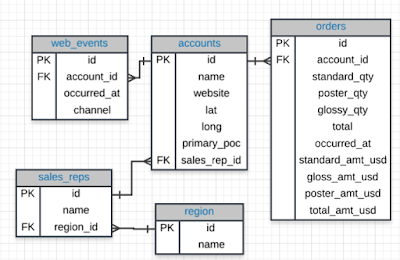
SQL Joins

Database Normalization:  Are the tables storing logical groupings of the data? Can I make changes in a single location, rather than in...