| Audience | An audience is the group of people or users who visit a specific website or who are reached by a specific ad campaign. |
| Ave. Cart: Average Cart | The average value of a user's cart who visited the site by clicking on a Criteo ad. |
| Bidding algorithms | To purchase inventory most efficiently, we use bidding algorithms to calculate the anticipated gain on an ad using mathematical formulas and sophisticated probability computations - all within a specified time constraint. |
Com. Win %:
Competition Win % | The percentage of displays an advertiser wins in automated bidding against all other advertisers using Criteo. |
| Conv. Rate PV: Conversion Rate Post View | The percentage of users who make a purchase on the advertiser website after viewing a Criteo banner. Conv rate PC = Purchases / Clicks |
| Conversion Rate | Conversion Rate is the percentage of people who clicked on an ad and completed the desired action. |
| Cookies | Piece of data stored on a user’s web browser. When a user visits a Criteo advertiser’s website, we place a cookie in the user's browser to collect information about the user (for example, which products they looked at). Cookies enable us to recognize our users and serve them a personalized ad. |
| COS: Cost Of Sales | The effective ROI from Criteo campaigns measured by dividing the Revenue generated Post Click by the Cost of the campaign: COS = Revenue / Sales PC |
| CPA: Cost Per Acquisition |
The amount an advertiser spends for a user's action, i.e. a purchase, a form submission, etc.
|
| CPC: Cost Per Click | The cost to an advertiser per click generated from Criteo ads. |
| CPM: Cost per Thousand Impressions | Cost per thousand impression (Cost Per Mille). Criteo pays publisher partners by a CPM basis: for every thousand impressions delivered on the partner’s website. (Revenue/Impressions) x 1000. |
| CPO: Cost Per Order | The cost to an advertiser per sale: total expenditure / number of sales. |
| CTR: Click Through Rate | The percentage of users who click on an ad after seeing it. CTR is calculated using the formula: Clicks/Impressions. |
| Dynamic ads | An ad dynamically and personally created for the user viewing it, in order to create additional engagement and (ultimately) sales. |
| eCPM | The predicted price that Criteo uses to effectively bid on inventory to gain access to the best users per advertiser. eCPM is calculated using the formula: eCPM = predictiveCTR x CPC x 1000 |
| Exposed Users | The number of users Criteo is able to show dynamic ads to. |
Dynamic Ads for Facebook/Instagram
| Dynamic Ads for Facebook & Instagram powered by Criteo extend the full capabilities of Criteo Dynamic Retargeting across Facebook and Instagram. Boost your campaign performance, and increase sales conversion across Facebook and Instagram by extending Criteo Dynamic Retargeting's unique capabilities to power Facebook Dynamic Ads across desktop and mobile. |
| Impression | Each time an ad is displayed on a publisher’s website. |
| Impression Win Rate | When an advertiser implements Criteo OneTag on their site, the user can be tagged for tracking. The impression win rate measures the number of impressions won over the number of impressions bid. |
| Lower funnel | We use the funnel to identify user engagement and intent. Those in the lower funnel are active, engaged users who have visited the advertiser's site within the last 30 days. |
| Mid funnel | We use the funnel to identify user engagement and intent. Those in the mid funnel are inactive, less engaged users, who have not visited the advertiser's site for more than 30 days. |
| Native ads | A type of advertising that matches the form and function of the platform in which it appears - giving the user a seamless experience. |
| Post Click | Post-click is the most effective way to measure interaction and accountablility for sales. It means an individual has clicked on the banner, returned to a website, and executed the desired action. It enables you to determine the true value from advertising as the click leads to an action. |
| Post View (or View-through) | Post-view (or view-through) is when an individual is served an ad anywhere on a page, but is not required to click on it. The user may not have seen the banner but sales are still claimed. |
| Reach | The volume and scale of Criteo's publisher access. The bigger the reach, the faster we can serve a relevant ad to the user and drive re-engagement in the buying cycle. |
| Recommendation | Criteo drives incremental value and sales by displaying recommended products in banners that a user didn’t see while on the site. These recommendations are created using a correlation of all user behaviour to create intelligent product links. |
| ROAS: Return On Advertising Spend | This is the return on investment in advertising spend used to measure the effectiveness of online marketing campaigns. The formula measures how much gross revenue is realized for every $ spent on advertising (dollars sold / dollar spent). |
| Static ads | Unlike dynamic banners, the content of static banners is pre-prepared - the element you can control is the condition that defines which pre-prepared option the user sees. These ads usually have a much lower CTR and CR compared to dynamic ads. |
| Tagged users % | Percentage of all site visitors that have had a Criteo cookie placed into their browser and are eligible to see dynamically created ads. |
| Universal Match | Criteo's unique ability to serve relevant and seamless ads across multiple platforms to an individual user. For example, a user who sees a product on desktop can be shown dynamic ads for that product on their smartphone, tablet and laptop, thereby increasing user engagement and experience. |
Monday, February 5, 2018
Ad-related Glossary from Criteo

Sunday, February 4, 2018
[GAB] 4th Quiz Answers (Google Analytics for Beginners)
1. What are the three different campaign tags that Google Analytics requires for accurate campaign tracking? B
2. Which of the following is NOT a standard Google Analytics campaign parameter? A
3. If you would like to quickly generate campaign tags for tracking, what tool should you use? C
4. Which of the following is the correct format for a custom campaign parameter added to a URL? B, C
(select all answers that apply)
5. Which of the following are examples of Goals in Google Analytics?
(select all answers that apply) A, B, D
6. When you create a Goal in Google Analytics, you must set up a funnel visualization. FALSE
7. If the Google Merchandise Store sets up a URL goal of “/thankyou” and a Match Type of “Begins with”, which of the following pages on www.googlemerchandisestore.com will count as goals? D
8. AdWords lets users advertise on which properties? A, B
(select all answers that apply)
9. Auto-tagging is the process in which AdWords can automatically tag your AdWords URLs. TRUE
10. Which of the following AdWords reports in Google Analytics should you use to investigate optimizing conversions by modifying bidding based on users' location? C
Saturday, February 3, 2018
[GAB] 1st Quiz Answers(Google Analytics for Beginners)
1. Google Analytics can collect behavioral data from which systems? A, B, C
(select all answers that apply)
Correct!
2. To track website behavior data with Google Analytics, which steps will you need to complete? B, C
(select all answers that apply)
Correct!
3. The Analytics tracking code can collect which of the following? A, B, C, E
(select all answers that apply)
Correct!
4. When will Google Analytics end a default session? C
Correct!
5. Once Google Analytics processes the data it collects, it’s stored in a database where it can’t be changed. A
Correct!
6. Which of the following best represents the hierarchical structure of a Google Analytics account from top to bottom? D
Correct!
7. A user with “edit” permissions at the Account level will automatically have “edit” permissions at the Property and View levels.
Correct!
8. To find your Analytics tracking code, which sequence of steps should you follow? B
Correct!
9. To use Analytics to track user behavior on your website, what must you add to each page of your site? C
Correct!
10. Where in the HTML of your webpage should you place Analytics tracking code? A
Correct!
11. New views can include website data from before the view was created. B
Correct!
12. If you delete a view, account administrators can recover the view using the “trash can” function within how many days? A
Correct!
13. What are the options for filtering data in Google Analytics? D
Correct!
14. Why is it important to keep one unfiltered view when using filters with Google Analytics? A
Correct!
15. Google Analytics filters data in the order in which the filters are set. A
Correct!
16. Filters allow you to reprocess historical data from before the filter was applied. B
Incorrect - review Unit 1, Lesson 4
Your score: 15/16 (93%)
Subscribe to:
Posts (Atom)
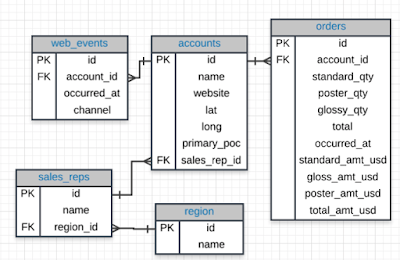
SQL Joins
Database Normalization: Are the tables storing logical groupings of the data? Can I make changes in a single location, rather than in...
-
1. Search Engine Optimization is Important Only 5.6% of clicks reach beyond the first page of search results. The first top 3 keywords ...
-
 I've started taking Digital Marketing Nanodegree at Udacity from Jan 2018. I'm going to write down what I've learned from the c...
 -
 Ad extensions: Enhance your Google Search Ads with additional, relevant information and give people reasons to check out your business. ...