Friday, February 23, 2018

[Search Engine Optimization] 04. Link Building

CREATE LINKS WITH MEANINGFUL ANCHOR TEXT
Links are essential for search engine navigation
o Allow search engine to discover new content
o Determine where a page should rank in the search engine results

Anchor text describes what an underlying link is about
- make it as descriptive as possible

FOCUS ON LINK BUILDING
Generate backlinks for your page to help build status in search results.

Focus on high quality links!
Two kinds of links:
- Organic links
- Manual/outreach links

Natural vs. Manual Link Building 
Natural(organic) links:
natural links are the links you do not have to ask for. They are naturally given to your website or page from external websites
Manual Outreach Links:
manual links are the links you gain by actively promoting your site and content

Black Hat Practices:
Black hat practices are the strategies and techniques employed with the intention of deliberately 'tricking' search engines
-> should avoid using self-created link
-> Quality > Quantity

LINK BUILDING STEPS
Evaluate current links (or links for a competitive site)
Identify high quality websites
Approach identified sites with link request

Link Building Tools and Evaluating Your Site
www.moz.com

Sunday, February 18, 2018

[Google Anlytics Advanced] Assessment L4 - Questions and Answers

1. In Google Analytics, what is “remarketing”?

 When users visit your website for the first time and complete a conversion
When you show users targeted ads to bring them back to your website and encourage a conversion
 When Google Analytics can’t distinguish a new user because they have deleted their browser cookies
 When a user buys an available product from a competitor

2. Which of these are remarketing audiences that you can define?
(select all answers that apply)

 Users who visited a specific page on your website
 Users who played a video on your website
 Users who purchased a product on your website
 Users who visited your store in person

3. What is the maximum duration that a user can be included in a remarketing audience that you’ve defined?

 120 days
 180 days
 365 days
 540 days

4. Which of these may be imported to define a remarketing audience?
(select all answers that apply)

 Pre-defined Segment
 Custom Segment
 Goals
 Channel Groupings

5. What does a remarketing audience require to be eligible for Search Ad remarketing in your AdWords account?

 100 cookies
 1000 cookies
 2000 cookies
 5000 cookies

6. Which of the following groups could you target with Dynamic Remarketing?
(select all answers that apply)

 Users who viewed your homepage
 Users who sign up to your email newsletter
 Users who viewed product detail pages
 Users who abandoned their shopping carts

7. To set up Dynamic Remarketing for a retail vertical, what must you link your AdWords account to?

 The Google Search Center
 The Google Analytics Center
 The Google Merchant Center
 The Google Help Center

8. To set up Dynamic Remarketing, what do you need to create in the Google Analytics Admin area?

 Custom Segment
 Custom Dimension
 Custom Metric
 Custom Report

[Google Analytics Advanced] Assessment L3 - Questions and Answers

1. Applying segments to your reports can help you isolate data for which of the following groups?

(select all answers that apply)

 Users 25 to 34 years of age who have their browser set to Spanish
 Users that viewed a page on your website and then watched a video
 Users that engaged in your social media or email campaigns
 Users who have children

2. You can create custom segments using which of the following criteria?

(select all answers that apply)

 Dimensions
 Metrics
 Session dates
 Sequences of user actions

3. How many segments does Google Analytics allow you to compare at once?

 1
 2
 3
 4

4. Segments are applied before sampling, so even if your data is being sampled, your segments will not be.

 True
 False

5. If you wanted to work with other websites to send traffic to your pages, which report can provide you with some potential ideas for partners?

 Channels report
 Source/Medium report
 Treemaps report
 Referrals report

6. If you wanted to see which pages on your site get the most traffic and highest engagement, which report can you view?

 Active Users report
 Engagement report
 All Pages report
 Frequency and Recency report

7. If you wanted to see a visual representation of which pages users entered your website on, what report should you view?

 Landing Pages report
 Behavior Flow report
 Content Drilldown report
 Treemaps report

8. In Multi-channel Funnel reports, conversions and ecommerce transactions are attributed to the last campaign, search, or ad that referred the user.

 True
 False

9. Multi-channel Funnel reports can credit conversions across which of these channels?

(select all answers that apply)

 Website referrals
 Paid and organic search
 Custom campaigns
 Television channels

10. How would Google Analytics credit a channel that contributed to a conversion prior to the final interaction?

 Primary conversion
 Assisted conversion
 Second-to-last-click attribution
 Last-click attribution

11. If you wanted to quickly view users that initiated sessions on your website over 1-day, 7-day, 14-day, and 30-day periods, which report should you use?

 User Explorer report
 Active Users report
 Users Flow report
 Behavior Overview report

12. If you wanted to group an audience based on their acquisition date and then compare behavior metrics over a series of weeks, which report should you use?

 Cohort Analysis report
 Active Users report
 Users Flow report
 Behavior Overview report

13. Custom Reports in Google Analytics let you do which of the following?

(select all answers that apply)

 Use multiple dimensions together in the same report
 Create a report with Custom Metrics
 Use a Custom Dimension as a primary dimension
 Include customer names and addresses

14. If you wanted to view a static, sortable table that displays rows of data, which type of Custom report should you create?

 Explorer
 Flat Table
 Map Overlay
 Pivot Table

15. Which of the following would prevent data from appearing in a Custom Report?

(select all answers that apply)

 You’ve applied a filter that filters out all of your data
 You haven’t shared that Custom report with users in the same view
 You have included dimensions and metrics of different scopes
 You’ve applied too many dimensions to the Custom report

Saturday, February 17, 2018

[Google Analytics Advanced] Assessment L2 - Questions and Answers

1. If you wish to collect data from two related websites with different domains in a single Google Analytics property, what feature must you set up?

 Advanced filters
 Cross-domain tracking
 Event tracking
 Custom Dimensions

2. Filters may be applied retroactively to any data that has been processed

 True
 False

3. If you wanted to see reports in a view with only data for users from the U.S. and Canada, which of these filters could you apply?

 Filter 1: include U.S. > Filter 2: include Canada
 Filter 1: include Canada > Filter 2: include U.S.
 Filter 1: include U.S. and Canada
 Filter 1: exclude Europe and Asia

4. If you wanted to view data in reports by different user categories such as Bronze, Gold, and Platinum status levels, what Google Analytics feature would you set up to collect this data?

 Custom Filter
 Custom Dimension
 Custom Metric
 Event Tracking

5. You should only pair metrics with dimensions if they are both in the same scope.

 True
 False

6. If you wanted to create a Custom Dimension to analyze user behavior by membership status (such as their rewards level), what scope would you apply?

 Hit
 Product
 Session
 User

7. Custom Dimensions can be used in which of the following reports?

(select all answers that apply)

 As primary dimensions in Standard reports
 As secondary dimensions in Standard reports
 As primary dimensions in Custom Reports
 As custom metrics in Custom Reports

8. You can apply a Custom Dimension to data you collected before you created the dimension and made it active.

 True
 False

9. If you wanted to collect the number of comments users posted to a webpage on your site, which of these would you set up?

 Custom Filter
 Custom Dimension
 Custom Metric
 Custom Alert

10. Custom Metrics can have which of the following scopes?

(select all answers that apply)

 Hit
 Product: whatever cost you've applied to each product is summed up
 Session
 User

11. What four parameters can you include with an event hit for reporting?

 Category, Action, Label, Total Events
 Category, Action, Label, Unique Events
 Category, Action, Label, Value
 Event, Category, Action, Label

12. If a user watches a video with event tracking three times in a single session, the number of Unique Events will be counted as:

 0
 1
 2
 3

Friday, February 16, 2018

[Search Engine Optimization] 03. Tags and Site Structure

Meta tags: 
pieces of text that get put inside the HTML code of a website

[Best Practices of SEO]

Be sure to: 
Include clear title tags
  • Create unique title tags for each page
  • Accurately describe the page’s content
  • Use brief, but descriptive titles
  • Title tag: 
    <title> this is title! </title>
    - tells search engines what the content on the page is all about
    - It is the title that will be displayed on the search engine results page
Provide a Meta Description tag
  • Use unique description tags for each page
  • Summarize the key information per page
  • Write high quality and concise description
Fill in the image and video blanks
  • Add descriptive captions
  • Use Alt Tags
  • Use descriptive file names
  • Provide a transcript or summary of video content
Clearly structure your URL
  • Use descriptive URLs, with words, not numbers and symbols
  • Use a directory structure for your URL
URL(Uniform Resource Locator): 

  1. http:// : the protocol
  2. store.: subdomain
  3. example.: domain
  4. com/: top-level-domain
  5. topics/subtopics/: folders or paths
  6. descriptive-product-name: page
  7. #top: named anchor
- make URL readable by humans
- make URLs descriptive and concise

OK Example:
http://www.mydomain.com/blog/articles/world-famous-autonomous-car-found-in-san-francisco-near-union-square
Better Example:
http://www.mydomain.com/blog/article/autonomous-car-SF
- Use Keywords
- Use a directory structure
Example: http://www.udacity.com/nanodegree/plus
✔ Domain
✔ Folder/Paths
✔ Page

Ensure a cohesive site structure
  • Develop a directory structure schematic for your site, starting with the home page
  • Ensure there is no orphaned content on your site
*A visual guide to keyword targeting and on-page SEO:
https://moz.com/blog/visual-guide-to-keyword-targeting-onpage-optimization

*Browseo
http://www.browseo.net/

*Meta and title tags best practices:
https://webmasters.googleblog.com/2007/09/improve-snippets-with-meta-description.html

* Google's SEO guide:
https://support.google.com/webmasters/answer/7451184?hl=en

[Search Engine Optimization] 02. Keywords

On-Site SEO
Keyword research is the first step in SEO
- High quality content helps customers to find you
- Keywords are the glue between how the search engine finds and classifies your content and how potential customers find you
- Keyword research helps inform what you should write about and it is a first step towards making your content discoverable

Head and tail keywords

Head keyword (about 30%): 
A popular keyword with large search volume
Head terms are often competitive to rank for in search results.

Tail keyword (about 70%): 
A unique or less popular set of keywords that tend to be longer and have lower search volume.
Tail terms are often less competitive to rank for in the search results.
-> more specific


-> balancing head and tail keywords is important.
-> Align the use of branded and non-branded keywords with the different stages of the customer journey

Branded and Non-branded keywords
Branded Keywords: 
keywords that contain your comapnies name

Non-branded keywords: 
Keywords that do not contain your companies name

Keyword Strategy: 
Use mix of branded, non-branded, tail and head keywords at appropriate stages throughout the customer buying journey

Step1: Keyword Discovery
- Organize an initial list of keywords in the med keyword lists
- Align the keywords with your customer prsona
Keyword Tool http://keywordtool.io/

Step2: Evaluating and focusing keyword list
- Evaluate and optimize your list for:
Volume
Difficulty
Opportunity

- Target keywords with high potential - combination of high volume, low difficulty and high opportunity(aggregated metric provided by Moz, keyword explorer)

*Understanding SEO:
https://moz.com/learn/seo/what-is-seo
* Google's SERP feature:
https://moz.com/learn/seo/serp-features

[SEO: Search Engine Optimization] 01. How Search Works

1. Search Engine Optimization is Important

  • Only 5.6% of clicks reach beyond the first page of search results. 
  • The first top 3 keywords on the first page get more than 50% of the total clicks. 
  • If your website is not ranked on the first page, the likeability of a customer finding your brand is very low.
2. Some Definitions

  • SERP(Search Engine Results Page) are the pages that the search engine serves for any given search term or query
  • SEO(Search Engine Optimization) focuses on the process of making changes to the design, content and link structure to improve a website's ranking, and therefore visibility, in search engine's unpaid/organic results
  • SEM(Search Engine Marketing) is where you pay to place a sponsored result(search ad) on the search engine results page


3. How Do Search Engine Work

  • Reading: Search engine robots(i.e. crawlers such as Spider for Google,) crawl and read the text on the web pages
  • Indexing: All page information gets indexed in a large database, using a uniform structure
  • Retrieving: Search engine retrieves info from the index based on keywords searched for and ranks results based on algorithms


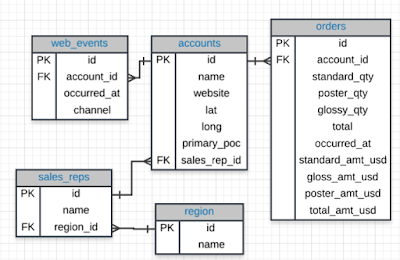
SQL Joins

Database Normalization:  Are the tables storing logical groupings of the data? Can I make changes in a single location, rather than in...